Most Claude Code Stacks Are Prompt Theater. gstack Is Something Else
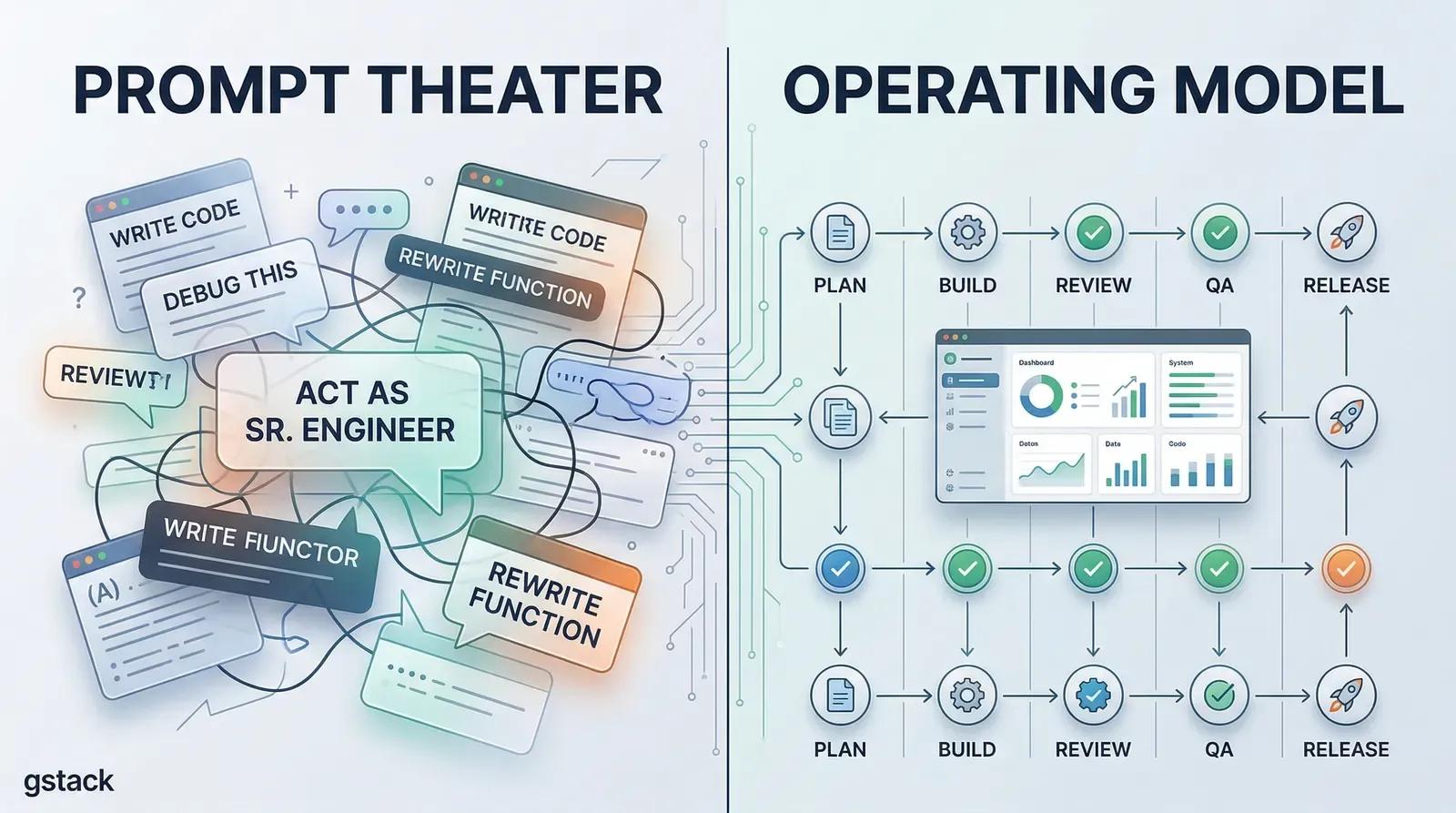
Most Claude Code stacks are easier to admire than to rely on.
You open the repo, see a wall of prompts, a few role names, and a promise that your one-person workflow is about to feel like a company with ten specialists. In practice, a lot of these setups are still the same thing with nicer packaging: one model, one long conversation, one blurred loop where planning, coding, reviewing, testing, and shipping all bleed together.
gstack is more serious than that.
After reading through the repository, my main takeaway is simple: this is not really a prompt pack. It is an attempt to turn Claude Code into an operating system for shipping software.
That is a much stronger idea than “here are some good prompts.”
The real product is not the personas
The easiest way to misread gstack is to focus on the surface layer.
You see commands like /office-hours, /plan-ceo-review, /plan-eng-review, /review, /qa, /ship, and /land-and-deploy, and the natural reaction is: this is a roleplay layer for Claude Code.
That reading misses the important part.
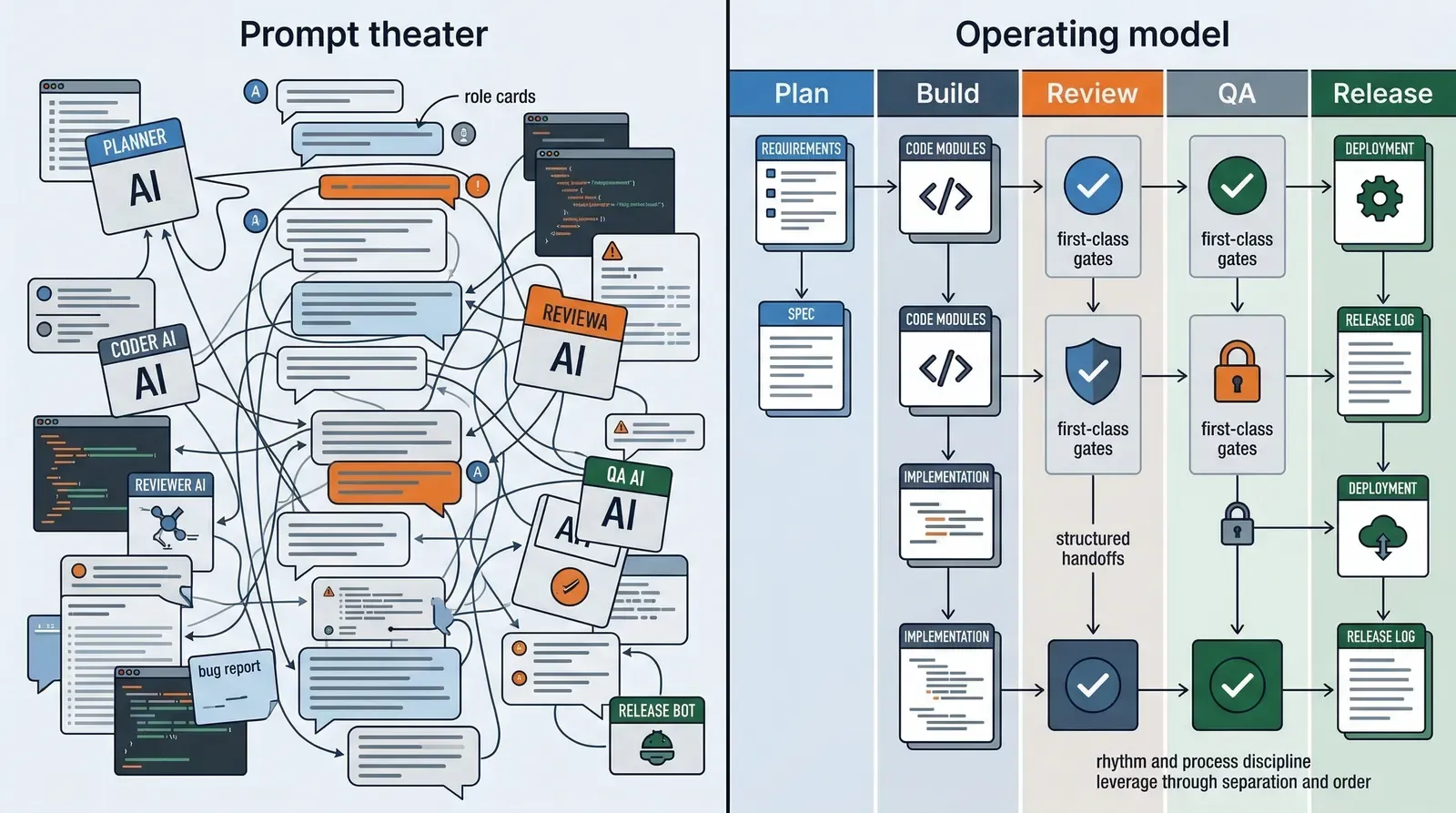
The personas are not the real product. The real product is the process boundary behind them.
What gstack is actually asserting is this:
- planning should be separate from execution
- product critique should be separate from implementation
- design review should happen before code hardens
- QA should use a real browser instead of model imagination
- release work should have its own path instead of being mixed into feature work
That is not prompt decoration. That is workflow design.
A lot of AI coding setups fail because they collapse everything into one undifferentiated loop. The same model is asked to brainstorm, design, code, review, test, and ship with no real boundary between those jobs. gstack is interesting because it refuses that collapse.
gstack is solving an operating model problem
This is the key thing I would pay attention to if you are evaluating the repo seriously.
The core insight is not that Claude needs more instructions. The core insight is that AI-assisted building becomes unreliable when there is no stable operating model around it.
That is why the project is built around specialized commands instead of one giant “build my product” prompt.
That is also why the quick-start path matters. The README does not tell you to use everything at once. It pushes you toward a narrow loop:
- describe what you are building
- review the plan
- review the code
- QA the result
- stop and decide whether the stack is actually helping
That sequence matters more than any single instruction file.
It is a workflow discipline disguised as a tool collection.
If you have ever watched an AI coding session drift into chaos, the problem usually is not “we needed one better prompt.” The problem is that nobody constrained the order of operations.
That is why gstack feels more mature than most repositories in this category.
The browser daemon is where the repo stops feeling superficial
The strongest technical signal in the project is the browser architecture.
A lot of AI toolchains claim they support QA or browser automation, but what they really mean is that they can launch a page, do one action, and throw the whole state away. That is fine for demos. It is weak for real QA.
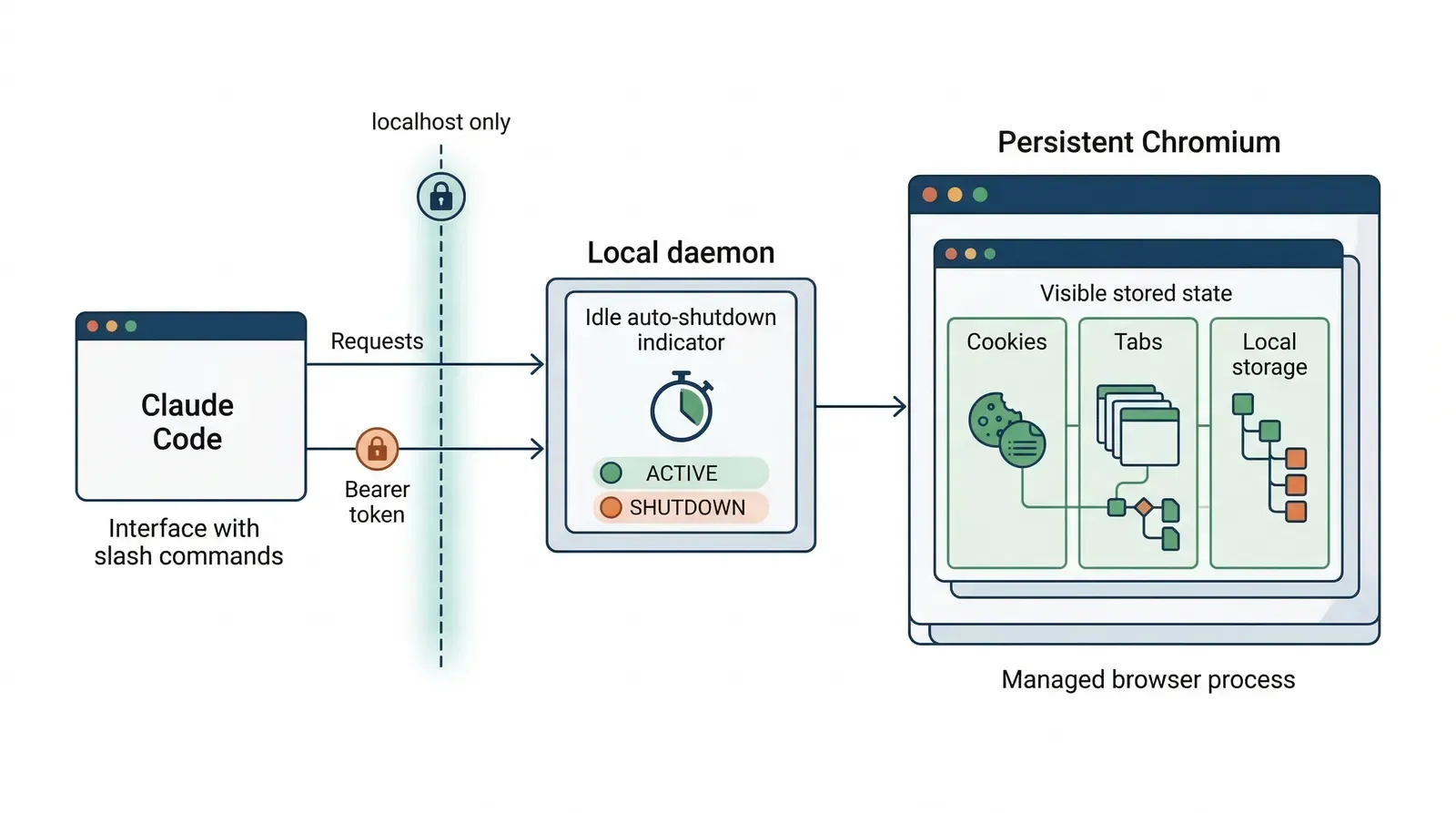
gstack’s architecture doc describes a persistent browser daemon built around Bun and Chromium. That matters because the design is optimizing for the right bottlenecks:
- the browser stays alive between commands
- cookies and local storage persist
- repeated commands become cheap HTTP round-trips instead of repeated cold launches
- idle shutdown is automatic
- the service is localhost-only and protected by a bearer token
That is not a flashy feature. It is a serious engineering choice.
It says the maintainers are thinking about state, latency, and operator friction, not just prompt wording.
This is exactly the kind of detail that separates a serious AI tooling project from a repository that mostly exists to sound futuristic.
What gstack gets right
1. It optimizes for leverage, not novelty
There is nothing magical about the raw ingredients.
Slash commands, Markdown instructions, browser automation, review flows, release flows, and role separation are all understandable ideas by themselves.
What is valuable is the way gstack composes them into a more opinionated shipping loop.
That makes it more useful than a lot of “AI engineer toolkit” repos that try to impress with feature count but never establish a strong default path.
2. It treats review as part of the happy path
This is one of the most mature instincts in the repo.
Too many AI coding workflows optimize for first-draft speed only. gstack is much more explicit that code review, QA, design review, and release work are not cleanup tasks. They are part of the normal operating path.
That sounds obvious until you compare it with how most people actually use AI coding tools.
Most users still behave as if speed is the product and verification is overhead. gstack is betting on the opposite: speed only compounds when quality gates are built into the loop.
That is the right bet.
3. It is opinionated in the right place
A lot of “opinionated” AI tooling is just aesthetic preference.
This repo is opinionated about process.
That is where rigidity actually helps.
Whether you prefer one prompt tone or one naming style is secondary. What matters more is whether your system forces planning, review, QA, and release to happen at all. gstack has a clear point of view there, and that is where the project becomes valuable.
Where people will get it wrong
The obvious risk is that users will copy the stack without understanding what problem it solves.
There are three predictable mistakes.
1. Treating the commands as magic
If someone installs gstack and expects the command names themselves to create engineering discipline, they will be disappointed.
A role label is not a system.
The value only appears if the user actually respects the boundary between planning, implementation, review, QA, and release. If every step gets skipped the moment it feels inconvenient, the stack collapses back into prompt theater.
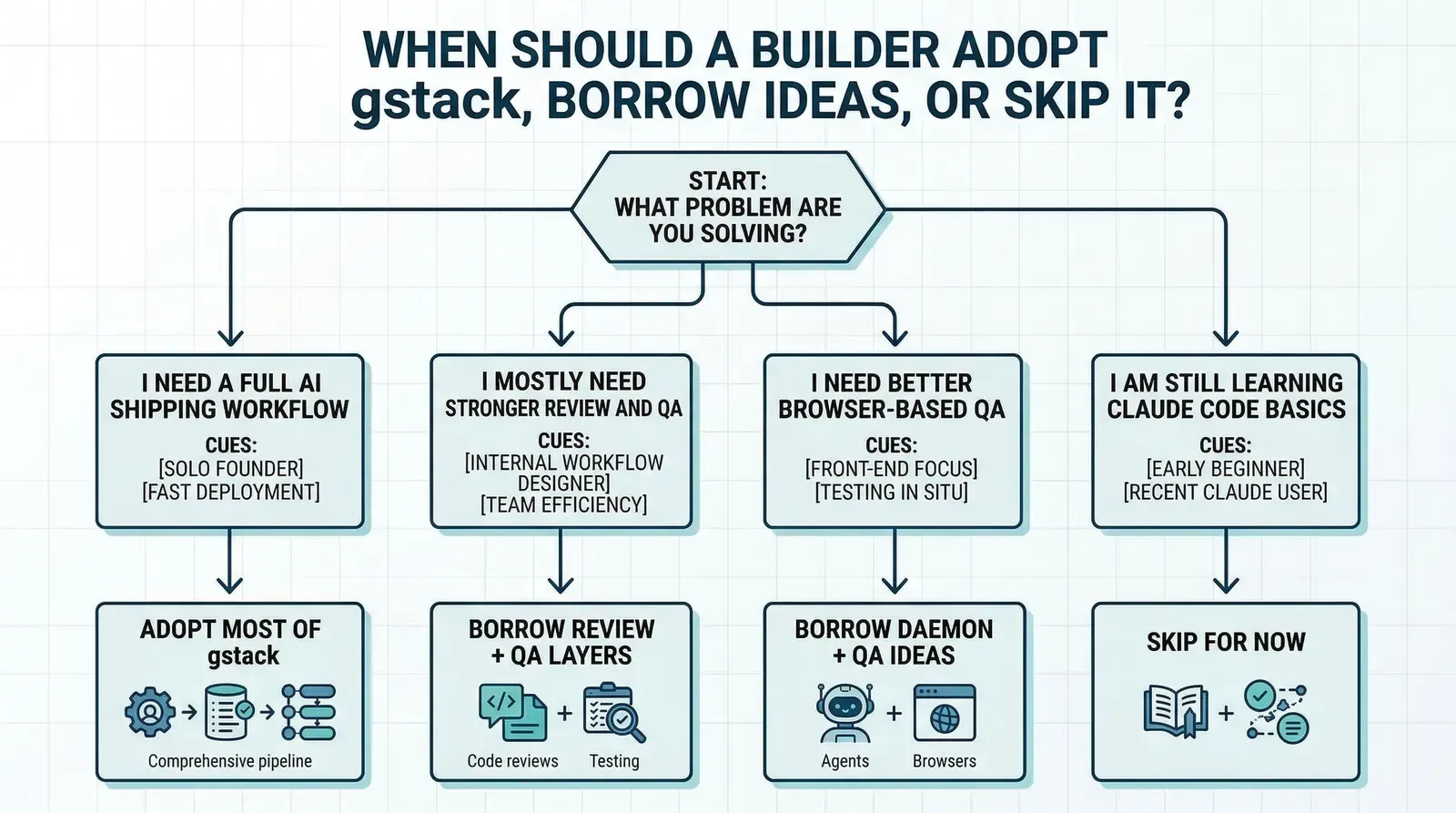
2. Installing the whole stack when only one layer is missing
Some teams do not need a full AI operating model yet. They need one missing piece.
Maybe they need a better review checklist. Maybe they need a browser-based QA path. Maybe they need a more explicit release command.
In those cases, adopting all of gstack at once may add more ceremony than leverage.
The right move may be to copy one or two ideas and ignore the rest.
3. Confusing readable Markdown with low complexity
A stack like this may look lightweight because the instructions are plain text and the interface is mostly slash commands.
That should not fool you.
This kind of workflow still assumes the operator has decent engineering judgment. You still need to know when a plan is weak, when a review note matters, when QA output is misleading, and when a release should stop.
gstack can structure work. It does not remove the need for judgment.
Who should actually study this repo
I think gstack is most useful for three groups.
Technical founders who still want to ship directly
If you are one person trying to move with the leverage of a small product team, the framing will make immediate sense.
Not because the “virtual team” metaphor is profound, but because the real bottleneck is usually context switching. The more recurring roles you can encode into a system, the less reset cost you pay when moving from plan to implementation to QA.
Engineers who already live in Claude Code
If Claude Code is already part of your daily loop, gstack is worth studying even if you never install it verbatim.
There is a lot to learn from how it slices work into commands and how it refuses to mix every concern into one interaction pattern.
Builders designing their own internal AI workflow
This may be the most important audience.
Even if you do not want Garry Tan’s exact stack, the repo is a useful case study in how to operationalize AI-assisted development without pretending a single prompt can replace process design.
What I would actually copy
If I were borrowing from this repo, I would copy these ideas first:
- separate planning commands from implementation commands
- make review and QA first-class steps instead of optional cleanup
- keep browser QA stateful instead of relaunching from scratch every time
- define a release path explicitly
- optimize for repeatable operating behavior, not clever prompts
That is the durable part.
The exact command set, naming, and team metaphor can change. The underlying lesson is more stable: AI coding gets more valuable when you design the workflow like a system, not a conversation.
Final judgment
gstack is not interesting because it gives Claude Code more personality.
It is interesting because it treats AI-assisted software development as an operations problem.
That is a more serious framing than most prompt-pack repositories ever reach.
I would not recommend that every builder copy the full stack blindly. For some teams, it will be too much process. For others, it will be exactly the missing structure that turns AI coding from fast chaos into repeatable output.
But I do think the project gets one big thing right:
the future of AI coding is probably not one better prompt. It is better process architecture.