9 Out of 10 Builders Missed This: The Complete Guide to Claude Code Dynamic Workflows
In the current wave of AI-assisted coding, most developers using Claude Code are still operating in a highly manual loop: they chain prompts by hand, copy outputs, paste them into the next prompt, fix what went wrong, and repeat.
Although Anthropic shipped Dynamic Workflows a couple of weeks ago (May 28, 2026), nine out of ten builders haven’t tried them even once. They are writing fifty prompts when a single automated workflow would do.
This guide breaks down the 14-step roadmap and the 6 design patterns Anthropic’s own engineers actually use in production—for migrations, deep research, sorting, root-cause analysis, triage, and evals.
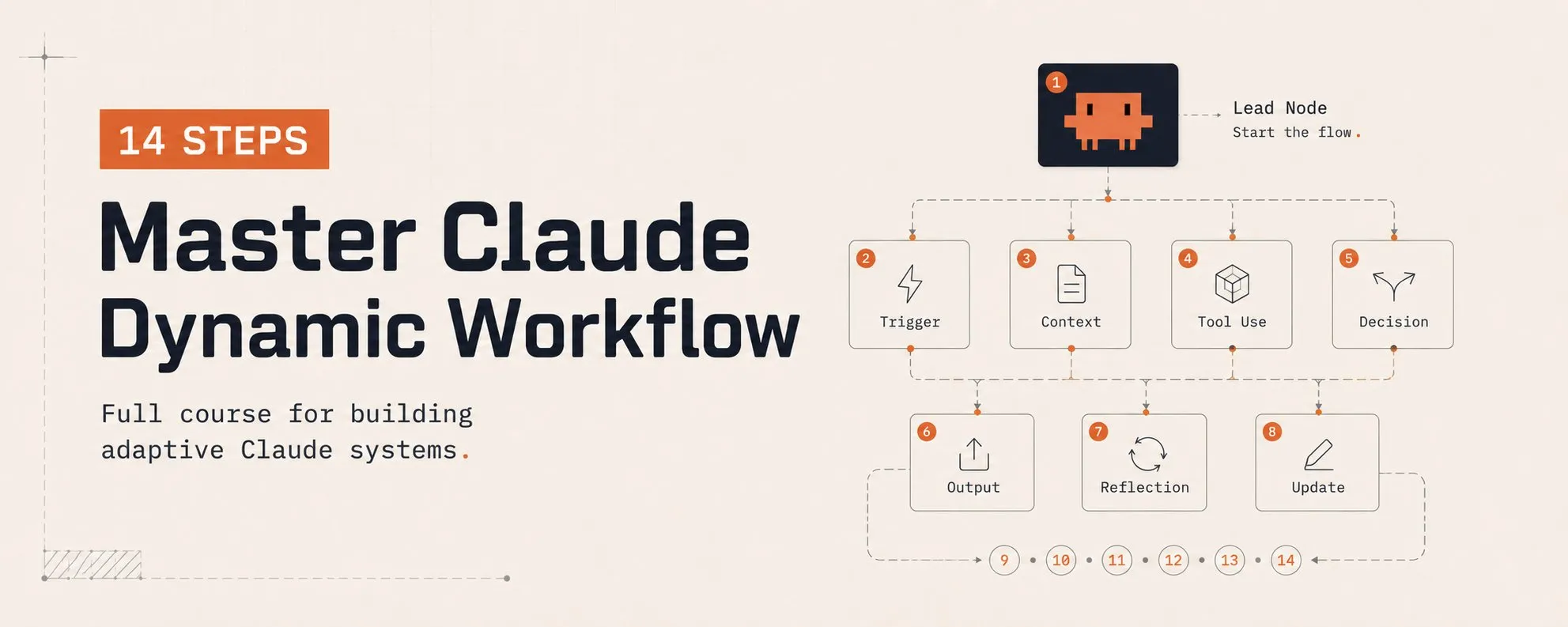
Part 1: The Mental Model & Failure Modes
01. What is a Dynamic Workflow?
The default Claude Code harness forces Claude to plan and execute within the exact same context window. For most everyday coding tasks, this is great.
However, for long-running, parallel, highly structured, or adversarial work, a single context window starts to break down.
A Dynamic Workflow is a custom harness that Claude writes for you on the fly, tailored specifically to your task, in JavaScript. It generates a local script that spawns and coordinates independent subagents via special API calls, using standard JavaScript (Math, JSON, Array operations) to process the data flowing between them.
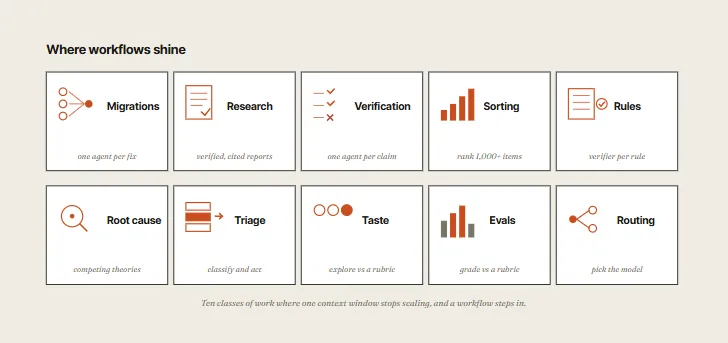
This architecture unlocks three capabilities that the default single-context harness cannot match:
- Per-Agent Isolation: Each subagent runs in its own context window with a single focused goal. This prevents cross-contamination and context bloat.
- Per-Agent Model Choice: The workflow selects which model is best suited for each subtask—e.g., Opus for hard logical reasoning, Haiku for cheap exploration, and Sonnet for standard coding.
- Per-Agent Isolation Level: The workflow decides whether an agent needs a clean Git
worktreecheckout or can run remotely without checking out any code.
02. The 3 Failure Modes Workflows Solve
To know when a workflow is the right tool, you have to understand the specific failures it prevents. The longer Claude works on a complex task in a single context window, the more susceptible it becomes to three distinct failure modes:
- Agentic Laziness: Claude stops before finishing a complex, multi-part task and prematurely declares it complete. For instance, in a 50-item security audit, it might handle 20 items and flag the rest as “already resolved”.
- Self-Preferential Bias: Claude prefers its own results when asked to verify or judge them against a rubric. A verifier with “skin in the game” cannot remain a neutral auditor.
- Goal Drift: The gradual loss of fidelity to the original objective across many turns, particularly after context compaction. Critical constraints (e.g., “do not modify module X”) quietly disappear by turn 47.
A workflow solves all three structurally. It distributes the work among separate Claudes with isolated states, clean contexts, and highly focused goals.
03. Static vs. Dynamic Workflows
Many developers have built static workflows using the Claude Agent SDK or claude -p by manually scripting instances together.
- Static Workflows are generic: written once, they must anticipate every edge case, which makes them highly conservative.
- Dynamic Workflows are generated dynamically by Claude for a specific task. The harness is custom-built around your exact environment.
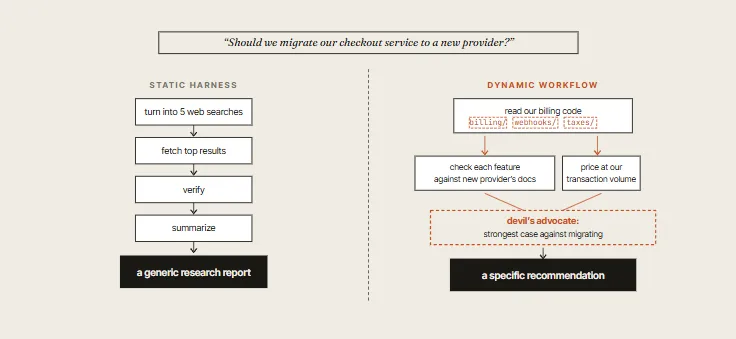
The reason the dynamic version outperforms static scripts isn’t the ability to search; it is that the workflow shapes itself around your codebase. It reads your billing logic, checks features against the actual live provider documentation, prices at your transaction volume, and runs an adversarial pass challenging its own emerging answer.
A static harness cannot do this because it has no prior knowledge of your code’s existence.
Part 2: The Core API & 6 Design Patterns
Three functions handle the heavy lifting in a workflow: agent(), parallel(), and pipeline().
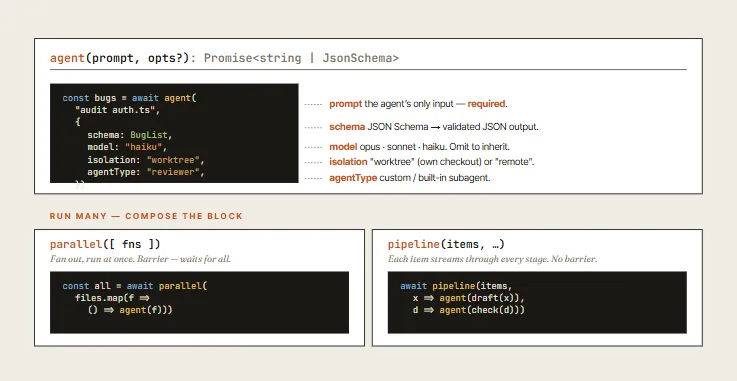
agent(): Spawns a subagent with a clean context and a focused goal.parallel(): Act as a barrier. It fans out multiple tasks concurrently and blocks, waiting for all of them to return before moving to the next stage.pipeline(): Enables streaming. Each item flows through every stage of the pipeline independently and sequentially.
Choose based on data dependency: Do you need all results compiled before you can proceed? If yes, use parallel. If no, use pipeline—it is faster, cheaper, and streams results continuously.
Using these primitives, Anthropic engineers have formalized 6 core patterns:
01. Classify-and-Act
A classifier agent evaluates the type and complexity of a task, then routes the work to different subagents or models.
- Why it matters: It allows you to save money by routing simple tasks to cheaper models (like Haiku) and invoking expensive models (like Opus) only where complexity demands it.
- Example: “Explain how the auth module works.” A classifier reads the directory, estimates complexity, and routes standard tasks to Sonnet but complex, multi-layered directories to Opus.
02. Fan-Out-and-Synthesize
Split a massive task into many small, independent steps. Run an agent on each step in parallel, and then synthesize the results into a single answer.
- Why it matters: It prevents the orchestrator from getting distracted by too many unrelated details. Each subagent operates inside its own clean window.
// Fan out: Run audit agents on files in parallel
const reviews = await parallel(
  files.map(file => () => agent(
    `Review ${file} for security issues`,
    { model: "haiku", schema: IssueList }
  ))
);

// Synthesize: Have an Opus agent merge everything into one report
const report = await agent(
  `Merge these reviews into one prioritized report:\n${JSON.stringify(reviews)}`,
  { model: "opus" }
);
03. Adversarial Verification
This is the structural fix for self-preferential bias. For every agent that generates work, run a separate verifier agent in a clean context to review the output against a rubric.
- The Pairing Rule: The verifier should only see the rubric and the generated artifact, not who produced it. Otherwise, bias will creep back in.
04. Generate-and-Filter
Generate a wide range of ideas or approaches, then filter them against a strict rubric. Deduplicate similar items and return only the highest quality results.
- Why it matters: It makes Claude commit late rather than commit early. Asking for “the best answer” immediately forces the model to settle on a solution. Generating and filtering forces it to challenge all assumptions before deciding.
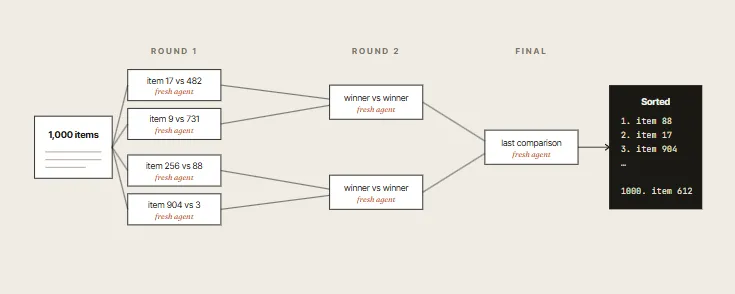
05. Tournament
When sorting or ranking a large list of taste-based items (such as UI designs or copy variants), absolute scoring fails. Instead, run a tournament where agents make pairwise comparisons.
- Why it beats absolute sorting: Attempting to sort 100 items in a single prompt degrades quality and bloats context. A tournament bracket splits comparisons across separate, lightweight agents, each judging just two items.
06. Loop Until Done
For tasks with open-ended objectives, loop the subagents and evaluate the output programmatically until a hard stop condition is met (e.g., zero test failures, no new errors in logs).
Part 3: Engineering Best Practices
In real-world applications, these patterns are combined to tackle complex software engineering workflows:
- Migrations and Refactors: Fan-out (one agent per file/test) $\rightarrow$ Adversarial verification (independent reviews) $\rightarrow$ Loop until done (verify tests pass). This is the pipeline Anthropic used to rewrite Bun from Zig to Rust.
- Deep Research (like the
/deep-researchskill): Parallel web searches $\rightarrow$ Adversarial verification (independent claim-checking) $\rightarrow$ Synthesizer (compiled report with citations).
01. Controlling Token Costs
Workflows can become expensive quickly. Use these three controls to keep them cost-effective:
/goal: Sets a hard completion requirement. Use it with the loop pattern to prevent the workflow from stopping at a soft completion point before the job is fully done./loop: Runs the entire workflow on a recurring schedule (e.g., weekly security sweeps, issue triage).- Token Budgets: Specify the token cap directly in your prompt (e.g.,
"Use 5k tokens"). This halts the run if Claude starts an ambitious but infinite loop.
> ultracode quick adversarial review of this assumption:
  "moving to Postgres eliminates our shard rebalancing."
  Use 5k tokens. /goal don't stop until you have either
  a counterexample or three independent confirmations.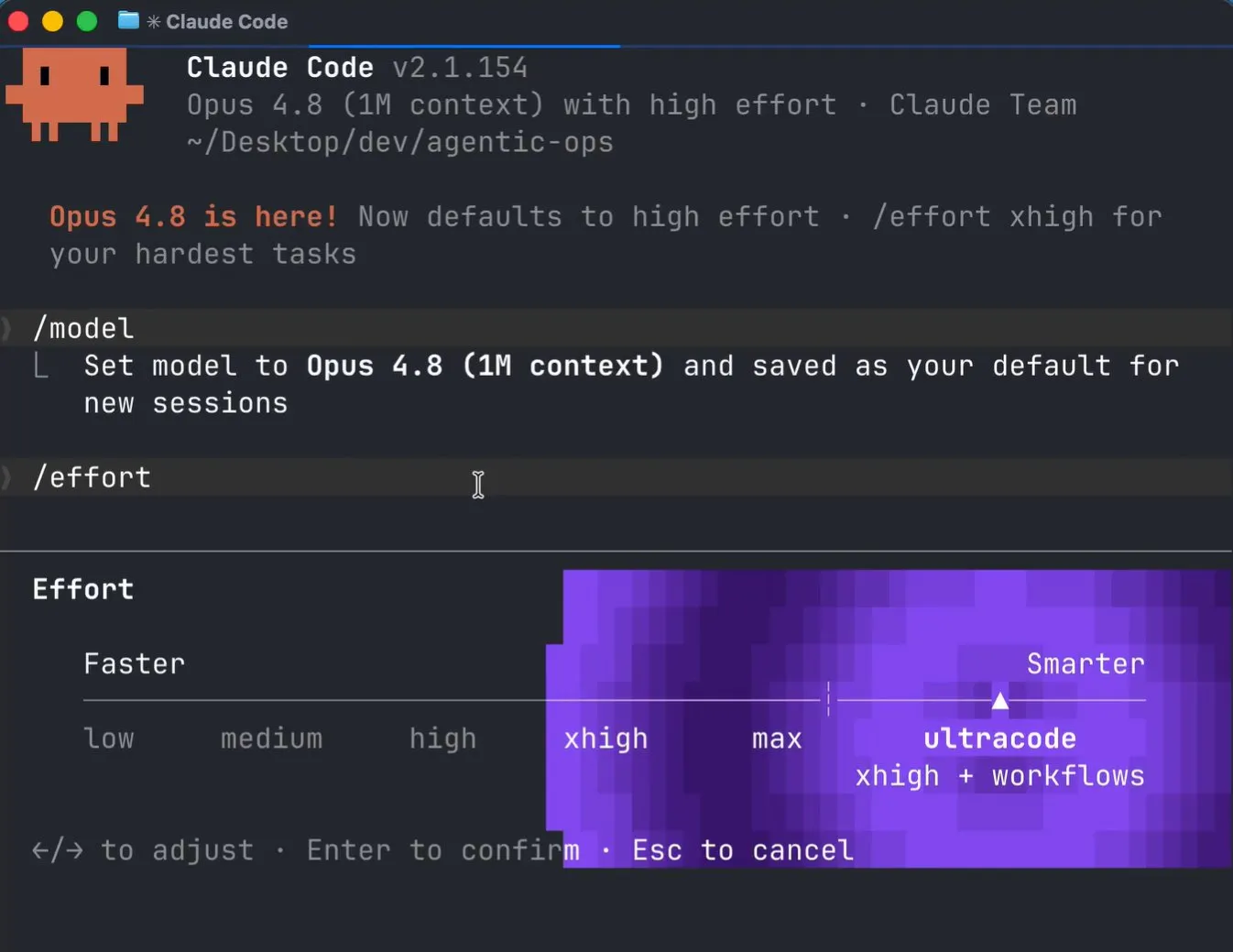
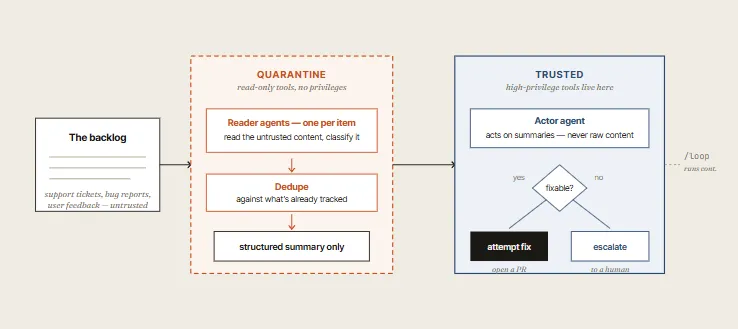
02. The Quarantine Pattern
Any workflow reading untrusted public input (user feedback, scraped pages, logs, public issues) is vulnerable to prompt injection.
The Fix: Separate your agents. Use a low-privilege Reader Agent to parse the raw data and output clean, structured JSON. The Actor Agent—which actually runs commands or writes code—never sees the untrusted raw inputs directly.
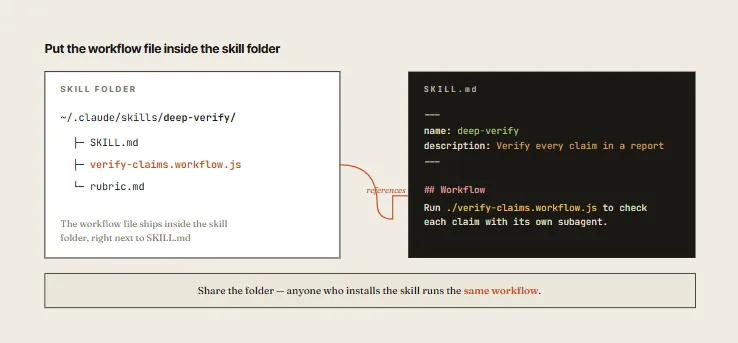
03. Solidify Workflows into Skills
Once a workflow is proven, press s in the workflow menu to save it locally to ~/.claude/workflows.
- Skill Packaging Tip: When converting a workflow into a reusable Skill, instruct Claude to treat it as a template rather than a rigid script. This gives Claude the flexibility to adapt the workflow’s shape to the specific layout of the next codebase it encounters.
Conclusion: Anti-Patterns to Avoid
When building workflows, keep these common mistakes in mind:
- Over-engineering: Do not spin up a panel of 5 reviewers for a task Sonnet can finish in one turn.
- No Token Caps: Letting a recursive loop run without a token budget.
- Self-Auditing: Letting the same agent write code and verify it.
- Barrier Confusion: Treating
parallel()andpipeline()as interchangeable. - Skipping
/goal: Letting a loop exit prematurely at a soft checkpoint.