Building YDLite: Turning yt-dlp into a Fast Local Windows App
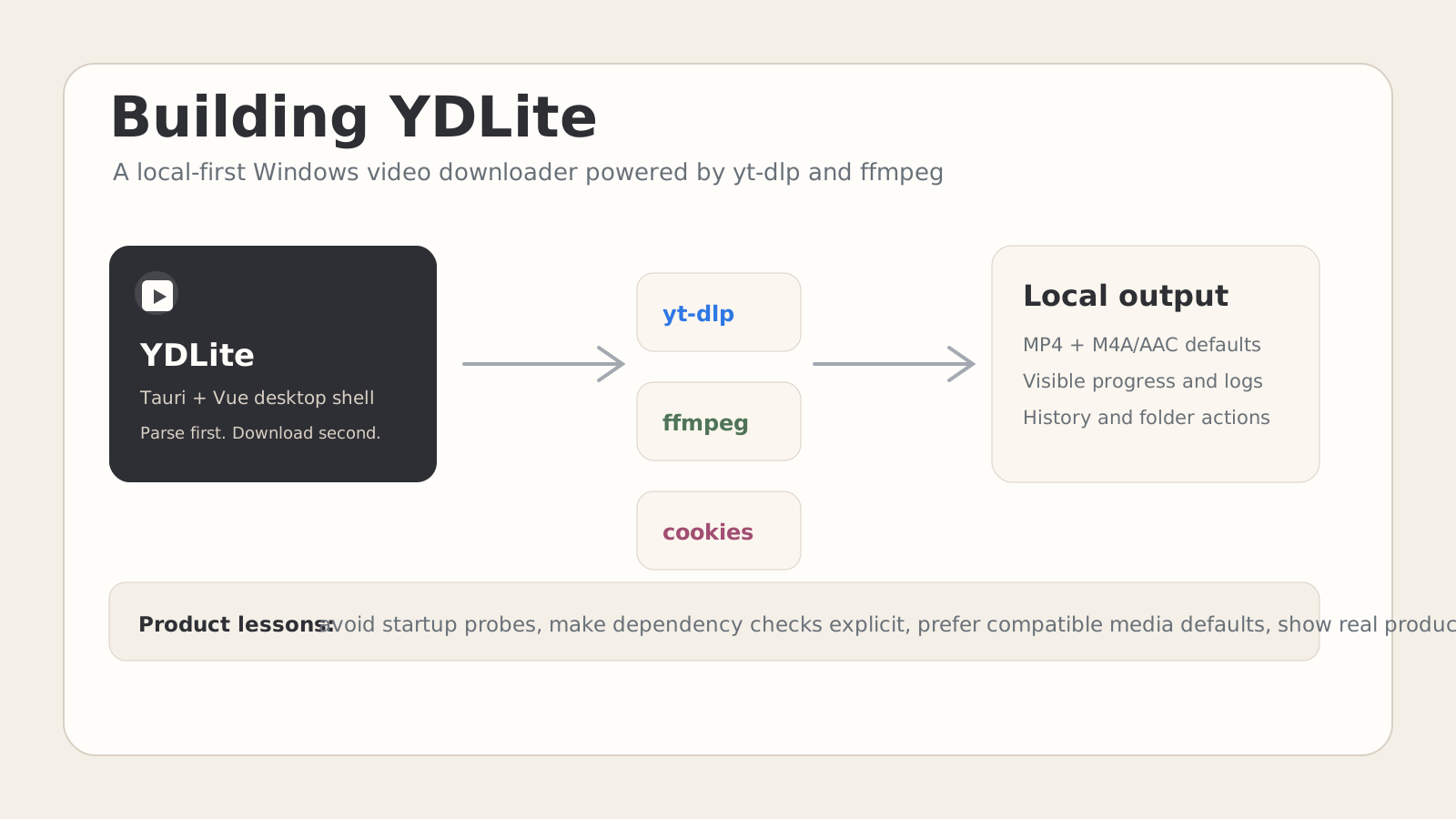
TL;DR: YDLite is a local-first Windows video downloader that wraps yt-dlp and ffmpeg in a small Tauri desktop app. The hardest parts were not the buttons or the download command; they were product decisions around startup speed, dependency checks, media compatibility, cookies, feedback, and making the landing page show the real product instead of a fake demo.
This post assumes basic familiarity with desktop app development, yt-dlp, and frontend product work. It is written as a build log and product review rather than a step-by-step tutorial.
The Product Goal
The first version of YDLite had a simple target:
Paste a video URL, parse it first, choose what to download, and keep the whole workflow local.
That sounds small, but it creates several concrete requirements:
- The app should open immediately.
- The user should know whether
yt-dlpandffmpegare available. - Parsing should feel like a clear intermediate step, not a hidden download attempt.
- The output should play well on normal Windows players.
- Private or login-gated links should be possible without making cookies the main UI.
- Progress should show enough detail to trust the process.
The final stack is deliberately boring:
Tauri 2 + Rust commands
Vue 3 + TypeScript frontend
yt-dlp for extraction and download
ffmpeg for merge/conversion
Cloudflare Pages for the landing page
The important constraint is local execution. YDLite does not upload URLs, cookies, downloaded files, or history to a server.
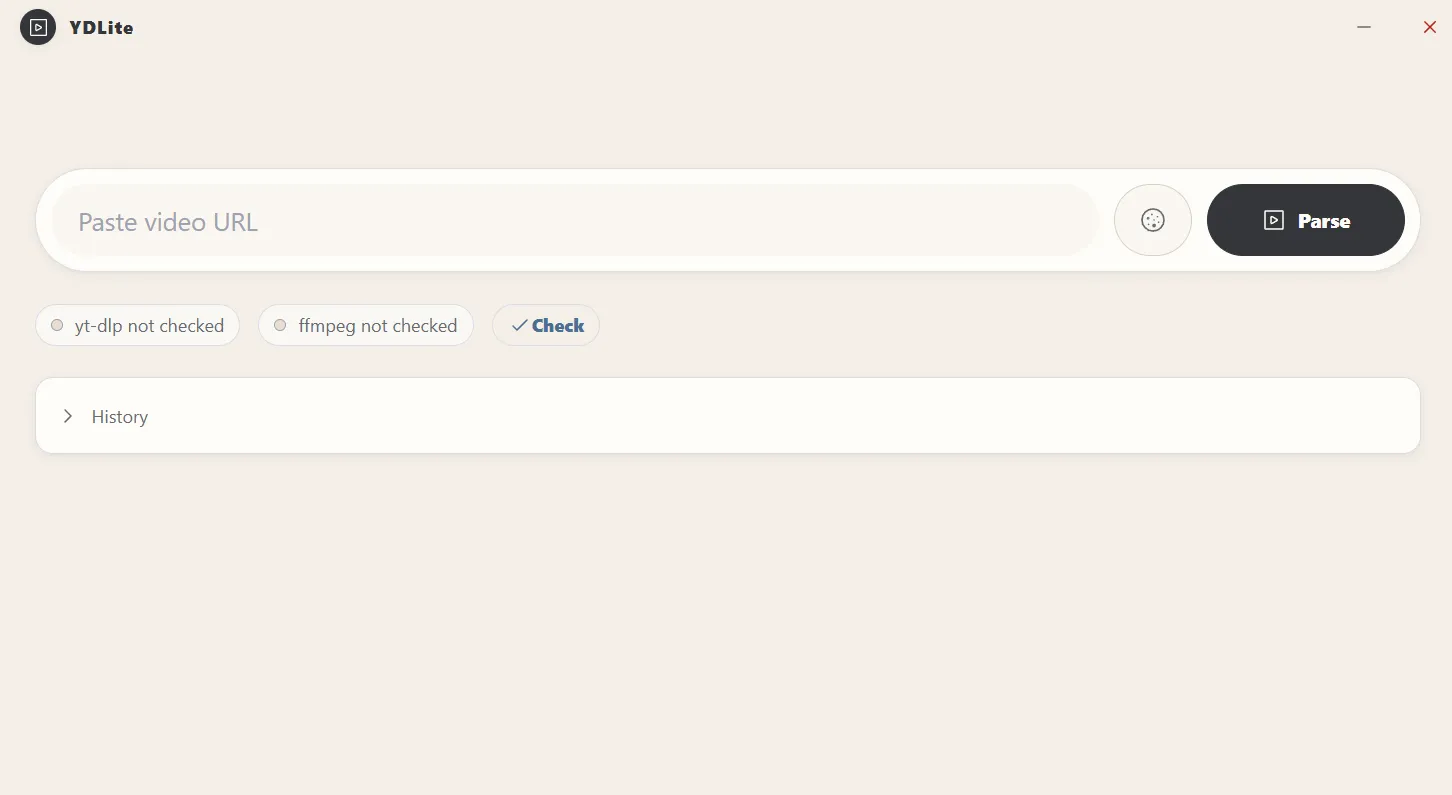
Early Problem 1: Startup Felt Too Slow
The initial implementation checked yt-dlp and ffmpeg automatically on launch. That was technically useful but wrong for perceived performance.
On a desktop app, launch speed is part of the product promise. If the first impression is a dependency scan, the app feels heavy even if the UI eventually works.
The fix was product-level, not just code-level:
- Do not check dependencies by default.
- Show
yt-dlp not checkedandffmpeg not checked. - Provide an explicit Check button.
- Keep install/update actions available after the user asks for tool status.
This changed the first-run experience from “the app is doing something I did not ask for” to “the app is ready, and I can verify tools when needed.”
The general rule:
Expensive verification should be user-triggered unless the app cannot function without it.
Early Problem 2: The Parse Flow Needed Stronger Feedback
The parser originally worked, but it was easy to miss the result if history or existing content pushed the parsed video lower on the page. That created a bad interpretation: the user clicked Parse, nothing obvious happened, and the app looked broken.
The fix was to treat parsing as a navigation event inside the interface:
- Parse starts with a clear loading state.
- On success, the parsed video block becomes the focus.
- If there is history above or below it, the UI still moves attention to the new result.
- Error messages map common
yt-dlpfailures into readable user-facing explanations.
That last point matters because raw yt-dlp errors are accurate but often not product-friendly. YDLite now distinguishes cases such as:
- Missing
ffmpeg - Unsupported URL
- Outdated
yt-dlp - Anti-bot or login-required pages
- Format not available
- Network failure
The result is not a perfect support system, but it is much better than dumping command output into the UI and hoping the user understands it.
Early Problem 3: Opus Audio Was Technically Correct but Practically Wrong
One real issue came from downloaded media that Windows reported as using unsupported Opus audio. The video could still play, but the audio track was not compatible with the user’s player.
From a yt-dlp perspective, selecting the best available stream can be reasonable. From a product perspective, “best” should include playback compatibility.
YDLite changed the default format strategy to prefer MP4 video with M4A/AAC audio:
bv*[ext=mp4]+ba[ext=m4a]/bv*[vcodec^=avc1]+ba[ext=m4a]/b[ext=mp4]/bv*+ba/bThe download command also uses:
--merge-output-format mp4 --no-playlist --newline -N 4 --windows-filenames --restrict-filenamesThis is a trade-off. Sometimes the absolute highest-quality stream may be in a different container or audio codec. For YDLite’s target user, a file that opens cleanly in common Windows players is usually the better default.
The product lesson:
A technically optimal media format is not always the best default. Optimize for the user’s playback environment.
Cookies: Useful, but Not the Main Character
Cookie support is necessary because many platforms increasingly gate content behind login, region, or anti-bot checks.
The UI mistake would be to make cookies visually compete with the main parse action. Most users paste public links most of the time. Cookies are a fallback path, not the primary path.
The final interaction model is:
- The URL input and Parse button dominate the hero workflow.
- Cookies are available as a compact icon button.
- If a cookie file is selected, the UI shows a small inline status.
- Parse attempts can fall back through clean/original URL strategies and selected cookies.
This keeps the default path fast while preserving support for harder links.
Architecture
The useful mental model for YDLite is a small local orchestration shell:
Vue UI
  -> Tauri command
    -> yt-dlp parse/download
      -> ffmpeg merge/conversion
        -> local file + progress events
Rust owns the system boundary:
- Resolving tool paths
- Running commands
- Parsing progress lines
- Emitting events to the frontend
- Installing or updating tools
- Validating local directories
Vue owns the interaction:
- URL input
- tool status
- parse result
- format selection
- playlist selection
- progress display
- history
That separation kept the codebase simple. The frontend does not need to know how to parse yt-dlp output, and the Rust side does not need to know how to lay out a playlist panel.
Landing Page Iteration: Fake Demos Lost Trust
The landing page went through several design passes:
- A bento grid of features
- A GSAP animated fake workflow
- A more concise product-first layout
- A real screenshot as the hero visual
The fake workflow looked polished but did not build enough trust. For a desktop utility, users want to see the real app. A stylized mock can help explain flow, but it should not replace product evidence.
The current landing page uses:
- A real YDLite screenshot
- A lightweight frame around the screenshot
- A simple product headline
- Download buttons for
.exeand.msi - A GitHub link in the navigation
- GSAP only for subtle entrance and floating motion
The screenshot also forced consistency. The site icon, navbar logo, and desktop app icon now use the same visual language.
The product lesson:
If the product is inspectable, show the product. Use animation to support the message, not to hide missing evidence.
What Worked Well
Manual Dependency Checks
Moving tool checks behind a button improved perceived speed immediately. It also made the startup state easier to explain: the app is open; tools are simply not checked yet.
Compatible Media Defaults
The MP4/M4A default reduced the chance of generating files that technically download but disappoint during playback.
Parse Before Download
Separating parse from download gives the user control. It also creates a natural place to show title, thumbnail, source, playlist entries, and format choices.
Local-First Framing
The product is easier to explain when the privacy model is simple: no cloud queue, no account system, no remote database.
What I Would Improve Next
1. Better Tool Diagnostics
The current Check button is useful, but diagnostics could become more actionable:
- Show exact tool path
- Show tool version
- Show install/update status
- Offer a one-click fix when a known issue is detected
2. Safer Format Presets
YDLite could expose a small number of presets instead of making users reason about formats:
- Compatible MP4
- Best quality
- Audio only
- Small file
Advanced users can still choose exact formats, but the default UI should stay simple.
3. Queue Controls
Playlist support exists, but queue control could become richer:
- Pause/resume queue
- Retry failed item
- Skip current item
- Save queue state
4. Better Error Recovery
Some errors should offer direct next actions:
- “Needs cookies” -> open cookie selector
- “
yt-dlpoutdated” -> update tool - “
ffmpegmissing” -> install tool - “Format unavailable” -> switch to compatible default
5. Signed Releases
For broader distribution, Windows code signing and a clearer release pipeline would matter. Unsigned installers create friction and reduce trust.
Final Takeaways
YDLite is a good reminder that a wrapper app is still a product. The hard parts are not just invoking yt-dlp; they are defaults, trust, feedback, compatibility, and distribution.
The strongest decisions were:
- Start fast.
- Let users explicitly check tools.
- Prefer media formats that play well on Windows.
- Keep cookies available but secondary.
- Show real product screenshots on the landing page.
- Write the README for both humans and search systems.
For small desktop utilities, these details often matter more than adding another advanced option.